Description
Can you find the flag on this website.
Solution
Want to try it yourself first?
The guided walkthrough reveals hints one step at a time.
sqlite_master, and data extraction. Use the SQL Injection Payload Generator to generate each UNION step with SQLite selected. The Burp Suite for picoCTF guide covers the Repeater loop that turns each enumeration step into one keystroke instead of a fresh browser request.Step 1Initial exploration
ObservationThe challenge is a login form with no source on offer. Start with an ordinary credential attempt and read whatever error comes back, since it may reveal the shape of the underlying query.Let's start by trying "admin" for both the username and password to see what happens. Looking at the error, we can see the SQL query being executed. Notice two important things: the password field comes first in the query, and it uses single quotes (not double quotes). This tells us where to inject our payload.For SQL injection, common comment characters are
#and--.sqlSELECT id FROM users WHERE password = 'admin' AND username = 'admin'What didn't work first
Tried: Injecting into the username field first because that is the more common target in login forms.
The error shows the query checking the password first and the username after the AND. Inject into the username and your payload lands behind a password check the database still evaluates. The tautology has to go in the password field to short-circuit the whole clause.
Tried: Using double quotes instead of single quotes in the injection payload because some SQL engines accept both.
The verbose error reveals the application wraps values in single quotes. Submitting a double quote leaves the string literal open and causes a syntax error rather than closing it cleanly. Always match the quote style shown in the error output.
Learn more
SQL injection (SQLi) occurs when user-supplied input is concatenated directly into a SQL query without sanitization or parameterization. The database engine cannot distinguish between the developer's intended query structure and the attacker's injected SQL code, so it executes both together.
The error message here is invaluable: it reveals the exact query template. Knowing that the password field appears first and uses single quotes tells you precisely where to inject and which quote character to close. Verbose error messages - which reveal internal query structure - are themselves a security vulnerability (CWE-209: Generation of Error Message Containing Sensitive Information) that should be disabled in production.
The two most common SQL comment styles are
--(ANSI standard, supported by PostgreSQL, SQLite, SQL Server) and#(MySQL-specific). Knowing which database backend is running helps you choose the right syntax. Stack traces and error messages often reveal the database type.Step 2Bypassing the login
ObservationThe error shows the password field coming first in the WHERE clause, with values wrapped in single quotes. So inject a tautology there: a quote, an always-true condition, and a comment to discard the rest.Now let's use a classic SQL injection payload in the password field. The first single quote closes the password string,OR 1=1is always true, and the--comment makes everything after it irrelevant.This transforms the SQL query into: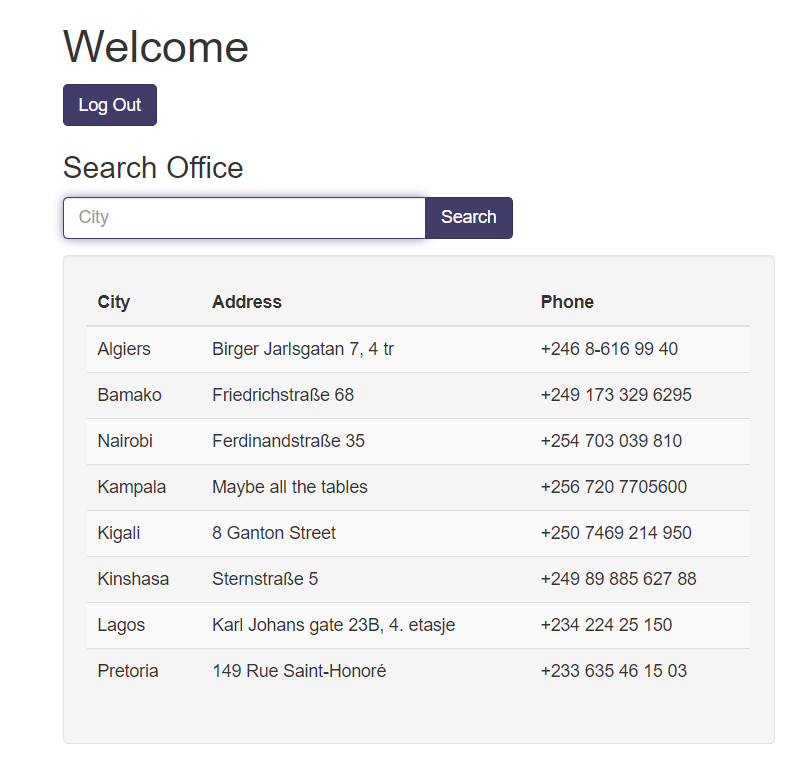 Success! We're in and now see a database interface with another input field, which means more SQL injection is needed.bash
' OR 1=1 --sqlSELECT id FROM users WHERE password = '' OR 1=1 --' AND username = 'does not matter'What didn't work first
Tried: Using # instead of - as the comment character to terminate the remainder of the query.
The # comment is MySQL-specific. This application uses SQLite (revealed by later schema queries), and SQLite does not treat # as a comment delimiter. The query fails with a syntax error, while - works across SQLite, PostgreSQL, and SQL Server.
Tried: Injecting ' OR '1'='1 without a trailing comment to avoid needing to know what comes after the payload.
Without a comment, the remainder of the original query still has to parse as valid SQL, which means lining your closing quote up with the opening quote of the username check. That is fragile. A trailing comment discards the remainder and is far more reliable.
Learn more
The payload
' OR 1=1 --works by exploiting the query structure. The opening single quote closes the string literal that started with the password field.OR 1=1adds a condition that is always true, so the WHERE clause evaluates to true for every row. The--comments out the rest of the original query (the username check), making it irrelevant. The result: the query returns at least one row, and the application logs you in.This is one of the most well-known attack patterns in web security - it appears in OWASP's Top 10 as "Injection." The definitive fix is parameterized queries (also called prepared statements), where SQL structure and user data are sent to the database separately:
SELECT id FROM users WHERE password = ? AND username = ?. The?placeholders are filled by the database driver, which treats the values as data - never as SQL code - regardless of what they contain.Step 3Finding the number of columns
ObservationThe post-login interface exposes another injectable field, which opens a UNION SELECT for extracting data. First establish the exact column count, using null placeholders.First, we need to figure out how many columns the query returns. We'll use a UNION SELECT with null values.bash' UNION SELECT null,null,null;--Before: After:
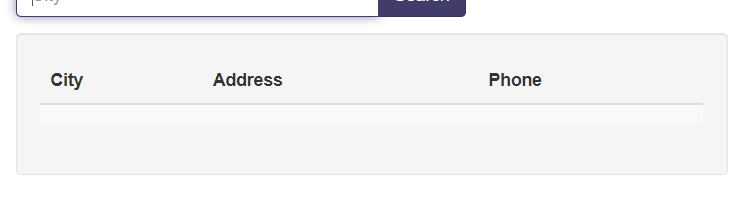 Perfect! The query works with three null values, which means we're dealing with three columns.
What didn't work first
Tried: Starting with ' UNION SELECT 'a','a','a';-- to detect displayed columns at the same time as counting them.
Substituting visible strings before the column count is confirmed fails outright if the count is wrong, because the UNION errors before anything prints. Establish the count with nulls, then replace them one at a time to find which positions actually render.
Tried: Using ' UNION SELECT 1,2,3;-- with integers instead of null to find both column count and display position in one shot.
Integer literals are not type-compatible with every column, so this can fail with a type mismatch error in strictly typed databases. null is universally compatible and is the standard enumeration value for this exact reason.
Learn more
UNION-based SQL injection appends a second SELECT statement to the original query using the SQL
UNIONoperator. For UNION to succeed, both SELECT statements must return the same number of columns with compatible data types. The standard technique to discover the column count is to tryUNION SELECT null,null,...with increasing numbers of nulls until the query succeeds instead of erroring.nullis used because it is compatible with every data type.Once the column count is confirmed, you identify which columns are displayed to the user (they must be of string type) by replacing nulls one at a time with a visible string like
'a'. The position where 'a' appears in the output is the column you will use to exfiltrate data in subsequent queries.This enumeration process is tedious to do manually. Tools like sqlmap automate the entire workflow - detection, column counting, type detection, and data extraction - but understanding the manual process is essential for CTF challenges where sqlmap may be blocked or too noisy.
Step 4Enumerating the database schema
ObservationA small CTF web app almost always runs SQLite underneath. Query sqlite_master and one UNION SELECT returns every table name and column definition.Since this is likely SQLite (common in CTF challenges), we can querysqlite_master, an internal table that contains schema information. The UNION must keep the same 3-column shape we discovered above, so we putsqlin one slot and pad the rest withnull.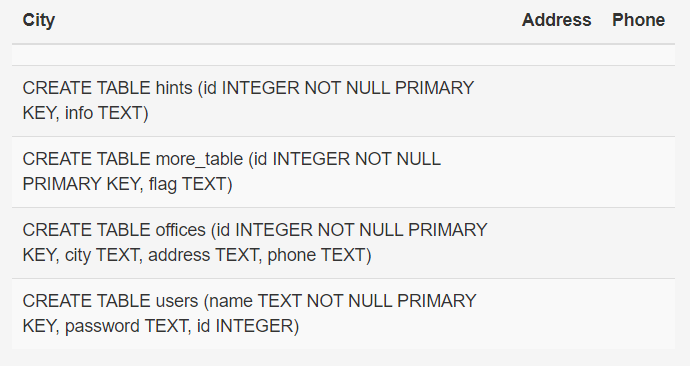 Excellent! From the output, we can see there's a table called
more_tablewith a column namedflag. That's exactly what we need!bash' UNION SELECT sql,null,null FROM sqlite_master;--What didn't work first
Tried: Querying information_schema.tables instead of sqlite_master to list all tables.
information_schema is a MySQL and PostgreSQL construct; SQLite does not implement it. The query returns an error stating the table does not exist. Small CTF web apps almost always run SQLite, so sqlite_master is the correct metadata table.
Tried: Querying sqlite_master without specifying WHERE type='table', which returns all object types including indexes and triggers.
This works and returns the table definitions, alongside extra rows for indexes and internal objects that can bury the one you want. Filtering on the object type gives a clean list, though here the output is short enough that it hardly matters.
Learn more
Every database engine exposes metadata about its own structure through special tables or views. In SQLite,
sqlite_mastercontains one row per database object (table, index, view, trigger) with the originalCREATEstatement in thesqlcolumn. This lets an attacker enumerate every table name and column definition in a single query.Equivalent metadata tables in other databases: MySQL/MariaDB uses
information_schema.tablesandinformation_schema.columns; PostgreSQL usespg_tablesandinformation_schema; Microsoft SQL Server usessys.tablesandsys.columns. Knowing which system you're targeting determines which metadata query to use.This schema enumeration step is critical in real-world SQLi attacks - it tells the attacker exactly what data exists before they start extracting it. Modern web application firewalls (WAFs) often block queries containing
information_schemaorsqlite_master, which is why understanding multiple bypass techniques is valuable.Step 5Extracting the flag
ObservationThe schema query turns up a table called more_table holding a column named flag. That is the target, so one more UNION SELECT against it returns the value.Now we just need to select the flag from more_table. You can put the flag in any column position.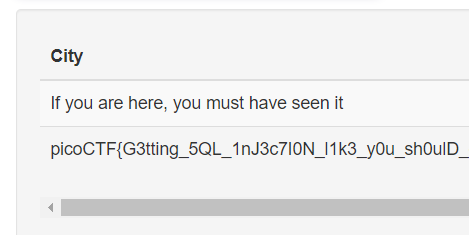 And there's the flag!bash
' UNION SELECT null,null,flag FROM more_table;--bash' UNION SELECT flag,null,null FROM more_table;--Learn more
With the table and column names confirmed, the final UNION SELECT directly reads the target data. Placing the interesting column in position 1, 2, or 3 (whichever appears in the output) lets you retrieve it. If the table has multiple rows, all of them appear in the result set - a UNION returns all matching rows from both SELECT statements.
In real-world SQL injection, the "flag" is whatever sensitive data the attacker is after: password hashes, credit card numbers, session tokens, private keys, or PII. The attack chain is always the same: bypass authentication, enumerate schema, extract target columns. The entire process takes minutes with sqlmap, or an hour manually - which is why parameterized queries are the only reliable defense.
For learning, try practicing SQLi on intentionally vulnerable applications like DVWA (Damn Vulnerable Web Application), WebGoat, or HackTheBox web challenges. Understanding both the attack and the defense makes you a better developer and security tester.
Interactive tools
- SQL Injection Payload GeneratorGenerate SQL injection payloads for auth bypass, UNION extraction, blind SQLi, NoSQL operator injection, and sqlmap commands. Supports MySQL, PostgreSQL, SQLite, and MSSQL.
Flag
Reveal flag
picoCTF{G3tting_5QL_1nJ3c7I0N_l1k3_y0u_sh0...}
The tail after sh0 is generated per instance, so the value your own UNION SELECT returns will differ from the one above. The prefix is stable across instances.
Key takeaway
How to prevent this
How to prevent this
Three independent failures gave the attacker the flag. Closing any one stops the chain.
- Parameterize.
cursor.execute("SELECT id FROM users WHERE password = ? AND username = ?", (pw, user)). The driver sends structure and data on separate channels; user input cannot become SQL. - Disable verbose database errors in production. The first screenshot literally printed the query template. Catch DB exceptions and return a generic 500; log the detail server-side only.
- Run the app's database account with read-only access to exactly the tables it needs.
UNION SELECT FROM sqlite_mastershouldn't even be permitted on the connection the login flow uses.